Your GA4 Migration Toolkit
Google Analytics is changing. From the 1st of July 2023, all data collected will use the new Google Analytics 4 (GA4) measurement platform instead of Universal Analytics (UA). This means businesses will need to migrate over to GA4 prior to this date to ensure that they are able to continue tracking and measuring website data. With brand-new settings, GA4 allows business owners to gain deeper insights into their online activities and make informed decisions based on more data.
To keep tracking website data after the 1st of July you will need to make the transition to GA4 as soon as possible, we recommend making the switch now. Here’s how to do it…
Get Started in 3 Steps
For most users, the process of switching to GA4 is easy. To get up and running, follow the three steps below:
1. Go to the Setup Assistant in your Google Analytics profile
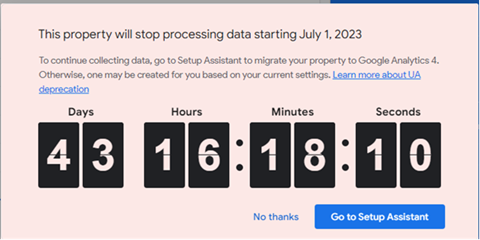
2. Click Get Started

3. Click Create Property
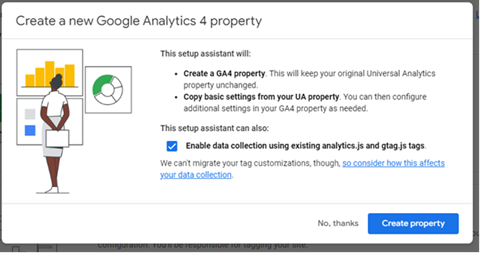
And that’s it.
For more information on straightforward migrations, Google has provided a useful starter guide that documents a few settings to look at in GA4:
Bespoke Tracking Scenarios
You may have a different type of website that needs a different approach.
For accounts with bespoke conversion events, Google Ads Links, and existing website tags, you may need to follow some extra steps to fully migrate your bespoke tracking settings onto GA4. We’ve included a handy guide from Google that you can follow.
Need more help?
As digital analytics experts, we are on hand to help you navigate the transition to GA4. If you need further help with your migration or have any other questions, please don’t hesitate to reach out to your consultant, who will be happy to discuss your migration and provide you with a quote to complete the move to GA4.
What happens if I don’t transfer before the deadline?
For any user who does not set up a GA4 property before July 1st, Google will automatically transfer the property using basic settings. We recommend manually transferring from Universal Analytics to Google Analytics 4 before the 1st of July, to make sure that your property is setup and configured correctly and includes the customisation that you want.
What happens to historical data?
From the 1st of July you will continue to be able to view historical data in your original UA property for a period of approximately 6 months. After this point it will no longer be possible to view any data in your UA property and so it is advised to export all of your historical data prior to 31st of December 2023.



